
Client
Portal
FAQ
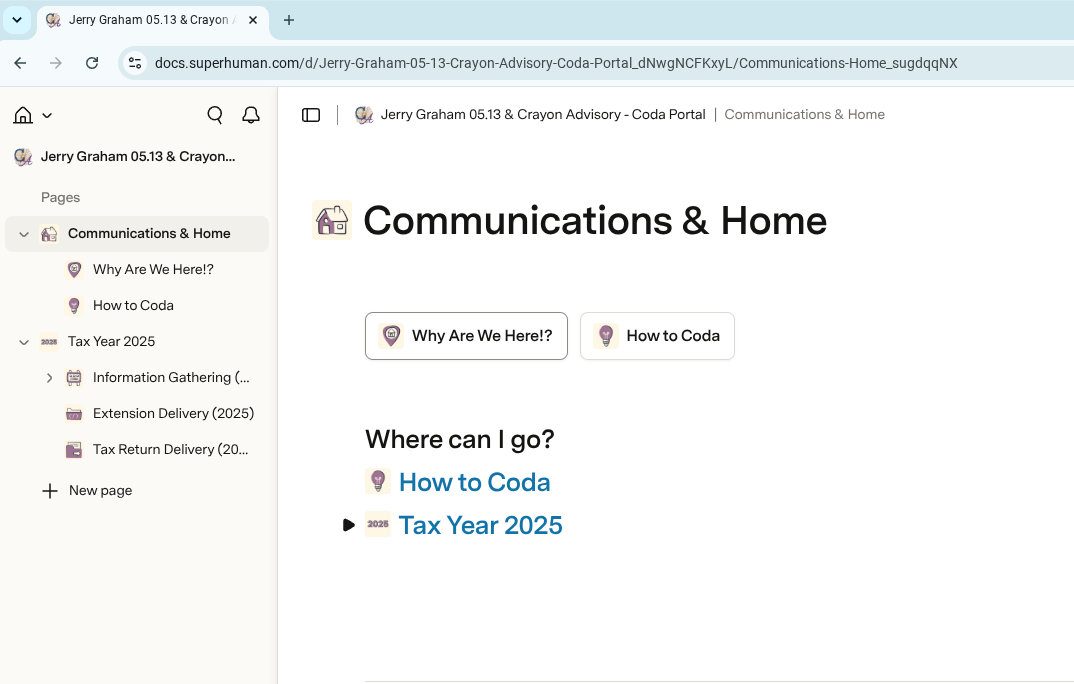
Your Superhuman Docs (formerly Coda) portal is your secure gateway to all things tax with Crayon Advisory. You can access your portal by logging in to Superhuman Docs (formerly Coda).
We began releasing “Coda Portals,” to clients in April 2026. Coda rebranded to Superhuman Docs on July 8th, 2026. We may refer to this portal as your, “SuperDocs Portal.”
If you’re a potential new client and I haven’t met you yet, please complete your Introductory Survey. If you’ve already done this, please sit tight – we’ll reach out as soon as is humanly possible.
Your Superhuman Docs (formerly Coda) portal is your secure gateway to all things tax with Crayon Advisory. You can access your portal by logging in to Superhuman Docs (formerly Coda).
We began releasing “Coda Portals,” to clients in April 2026. Coda rebranded to Superhuman Docs on July 8th, 2026. We may refer to this portal as your, “SuperDocs Portal.”
If you’re a potential new client and I haven’t met you yet, please complete your Introductory Survey. If you’ve already done this, please sit tight – we’ll reach out as soon as is humanly possible.
Client pORTAL
We’ve built a custom portal solution using Superhuman Docs.
We’re firm believers in consistency and flexiblity. Superhuman Docs give us both of these things.
As external optimists, we’re incredibly excited for what we can offer with and through a portal powered by Superhuman Docs, especially for tax season 2027.
I'm a new client what does this mean?
New clients will be onboarded directly into Superhuman Docs. You’ll have a clean, fresh, unburdened experience as you get to know us.
What do I need to do to get into Superhuman Docs?
You can sign up for a free account with Superhuman Docs at any time by heading to https://superhuman.com/docs.
Signing up for an account will not immediately grant you access to your Crayon Advisory SuperDocs Portal. We have to build your Doc behind the scenes and grant you access to it.
What is Superhuman Docs?
Superhuman Docs is a collaborative tool offering a single surface for every kind of work. We’ve been using it since 2021 when we started building our customized CRM. With tools from writing to tables to voting and more, the possibilities are nearly endless. We even used it to build out our first Deeper Dive.
Is Superhuman Docs Secure?
The short answer: yes.
You can read more about Superhuman Docs’s security here.
Your SuperDocs Portal (Coda Portal) will be shared with you directly. It will be built so only you, your spouse, and third parties you’ve requested have access to your portal have access.
What will happen to my files?
We keep all of your files backed up in our systems. Your tax returns and other deliverables will be uploaded to your SuperDocs Portal.
What's different?
There is so much different!
We’ve taken feedback we’ve received over the years and combined it with what we know works and what doesn’t to give you a unique portal experience that allows you to access the information you need quickly and easily.
Because we’ve built this system from the ground up, we have quite a bit of flexibility in how you interact with it.
Is there an app?
There is, indeed, an app! Mobile users can download the app from their respective App Store. You’ll also be able to access Superhuman Docs from the desktop site even on a mobile device.
We have tested the app on both types of devices and are reasonably satisfied with it. However, 99% of our use, and testing, occurs in the web version. App behavior may vary from the web version, and that variance may be significant.
Can I scan paper?
Superhuman Docs does not have a button to scan new files when uploading them. Please scan files prior to uploading them.
You can scan a file from your mobile device. Be sure to use the scanning feature, not your camera:
- On an Android device, this is easiest to do by opening Google Drive, selecting the, “+,” button, and then “Scan.”
- On an iOS device, open the Files App, select the three dots right above files, and select “Scan Documents.”
When scanning paper, place the paper on a flat, dark surface. Hold your device directly over the paper so the device is parallel to your flat surface. Do this in front of a window or open door for best lighting results.
What about tax season preparedness, planning and projections?
Much like last year, we’ll be offering options for tax season prearedness as well as tax projections and planning.
Generally, if your income is changing by 20% or more (up or down) or if you have new income or deductions available to you, we encourage you to consider tax projections and/or planning.
If you own a business or are concerned about the information necessary to prepare your tax return, we encourage you to participate in tax season preparedness.
At the writing of this FAQ Megan is more focused on this FAQ itself than on the details of planning, projections, and tax season preparedness. Planning and projections are always available to you – we just need to know you want to get started and we’ll make it happen. Tax Season Preparedness will be put together soon, with those details going out as part of your introduction to Acounta.
Will this tell me when you're working on my tax return?
No.
At least, not yet.
We’re well aware the most sought after tool has always been a tracker that tells you the status of your tax return at any given time. Superhuman Docs has quite a bit of additional functionality and we may be able to offer this in the future. For the time being, we’re focused moving through tax returns.
How quickly can I get my tax return?
The answer to that is a resounding, “it depends.” Megan will pick up, open up, work on, and complete your tax return as soon as possible. That process starts when you provide all of your initial information, and will re-start after you’ve provided additional information.
How do I know what I need to start providing and when?
Your SuperDocs Portal is built out with a home page to help you get oriented to what is where. Click the buttons on the home page to jump around to where you might need to be. Or scroll down on the home page. You’ll see a space for Secure Messages and then a space for Action Items. Action Items are things you need to do or confirm before we can take the next step.
Where can I find my Organizer? What about Questionnaires? And what's the difference?
We’ll add relevant questionnaires as Action Items to your SuperDocs Portal.
Most of these are standardized. However, some of these questionnaires may be partially or even completely customized to you and your tax situation.
In the past, we’ve been like other preparers and called these, “Organizers.” With the 2024 tax season, we started calling these, “Questionnaires,” to better reflect both how they show up for you and what they’re doing.
Can I just send you my information over email?
The short answer? It depends. If you’re trying to send a tax document or other attachment or provide any information you want to only come to Crayon Advisory, the answer is no.
Email is a great tool to reach out, ask a question, or otherwise start a conversation. That moment when you know you need help but you’re not sure? Email is a great place to just send a few words my way and move the needle forward.
As wonderful as email is, it’s not secure, and should not be used for transmitting anything with something you’d want handled with discretion. Instead, please make use of your SuperDocs Portal Page to upload files or leave Secure Messages.
Our email automatically removes attachments at the server for your and every other client’s protection. If you receive a notice, you’ll need to upload it to your SuperDocs Portal Page, preferably as a PDF. Please remember to upload all pages of a notice you receive.
Client pORTAL
WE’ve built a custom portal solution using Superhuman Docs.
We’re firm believers in consistency and flexiblity. Superhuman Docs give us both of these things.
As external optimists, we’re incredibly excited for what we can offer with and through a portal powered by Superhuman Docs, especially for tax season 2027.
I'm a new client what does this mean?
New clients will be onboarded directly into Superhuman Docs. You’ll have a clean, fresh, unburdened experience as you get to know us.
What do I need to do to get into Superhuman Docs?
You can sign up for a free account with Superhuman Docs at any time by heading to https://superhuman.com/docs.
Signing up for an account will not immediately grant you access to your Crayon Advisory SuperDocs Portal. We have to build your Doc behind the scenes and grant you access to it.
What is Superhuman Docs?
Superhuman Docs is a collaborative tool offering a single surface for every kind of work. We’ve been using it since 2021 when we started building our customized CRM. With tools from writing to tables to voting and more, the possibilities are nearly endless. We even used it to build out our first Deeper Dive.
Is Superhuman Docs Secure?
The short answer: yes.
You can read more about Superhuman Docs’s security here.
Your SuperDocs Portal (Coda Portal) will be shared with you directly. It will be built so only you, your spouse, and third parties you’ve requested have access to your portal have access.
What will happen to my files?
We keep all of your files backed up in our systems. Your tax returns and other deliverables will be uploaded to your SuperDocs Portal.
What's different?
There is so much different!
We’ve taken feedback we’ve received over the years and combined it with what we know works and what doesn’t to give you a unique portal experience that allows you to access the information you need quickly and easily.
Because we’ve built this system from the ground up, we have quite a bit of flexibility in how you interact with it.
Is there an app?
There is, indeed, an app! Mobile users can download the app from their respective App Store. You’ll also be able to access Superhuman Docs from the desktop site even on a mobile device.
We have tested the app on both types of devices and are reasonably satisfied with it. However, 99% of our use, and testing, occurs in the web version. App behavior may vary from the web version, and that variance may be significant.
Can I scan paper?
Superhuman Docs does not have a button to scan new files when uploading them. Please scan files prior to uploading them.
You can scan a file from your mobile device. Be sure to use the scanning feature, not your camera:
- On an Android device, this is easiest to do by opening Google Drive, selecting the, “+,” button, and then “Scan.”
- On an iOS device, open the Files App, select the three dots right above files, and select “Scan Documents.”
When scanning paper, place the paper on a flat, dark surface. Hold your device directly over the paper so the device is parallel to your flat surface. Do this in front of a window or open door for best lighting results.
What about tax season preparedness, planning and projections?
Much like last year, we’ll be offering options for tax season prearedness as well as tax projections and planning.
Generally, if your income is changing by 20% or more (up or down) or if you have new income or deductions available to you, we encourage you to consider tax projections and/or planning.
If you own a business or are concerned about the information necessary to prepare your tax return, we encourage you to participate in tax season preparedness.
At the writing of this FAQ Megan is more focused on this FAQ itself than on the details of planning, projections, and tax season preparedness. Planning and projections are always available to you – we just need to know you want to get started and we’ll make it happen. Tax Season Preparedness will be put together soon, with those details going out as part of your introduction to Acounta.
Will this tell me when you're working on my tax return?
No.
At least, not yet.
We’re well aware the most sought after tool has always been a tracker that tells you the status of your tax return at any given time. Superhuman Docs has quite a bit of additional functionality and we may be able to offer this in the future. For the time being, we’re focused moving through tax returns.
How quickly can I get my tax return?
The answer to that is a resounding, “it depends.” Megan will pick up, open up, work on, and complete your tax return as soon as possible. That process starts when you provide all of your initial information, and will re-start after you’ve provided additional information.
How do I know what I need to start providing and when?
Your SuperDocs Portal is built out with a home page to help you get oriented to what is where. Click the buttons on the home page to jump around to where you might need to be. Or scroll down on the home page. You’ll see a space for Secure Messages and then a space for Action Items. Action Items are things you need to do or confirm before we can take the next step.
Where can I find my Organizer? What about Questionnaires? And what's the difference?
We’ll add relevant questionnaires as Action Items to your SuperDocs Portal.
Most of these are standardized. However, some of these questionnaires may be partially or even completely customized to you and your tax situation.
In the past, we’ve been like other preparers and called these, “Organizers.” With the 2024 tax season, we started calling these, “Questionnaires,” to better reflect both how they show up for you and what they’re doing.
Can I just send you my information over email?
The short answer? It depends. If you’re trying to send a tax document or other attachment or provide any information you want to only come to Crayon Advisory, the answer is no.
Email is a great tool to reach out, ask a question, or otherwise start a conversation. That moment when you know you need help but you’re not sure? Email is a great place to just send a few words my way and move the needle forward.
As wonderful as email is, it’s not secure, and should not be used for transmitting anything with something you’d want handled with discretion. Instead, please make use of your SuperDocs Portal Page to upload files or leave Secure Messages.
Our email automatically removes attachments at the server for your and every other client’s protection. If you receive a notice, you’ll need to upload it to your SuperDocs Portal Page, preferably as a PDF. Please remember to upload all pages of a notice you receive.